Appearance
Email & Password Authentication
- Enable secure register and login using email and password credentials for your SaaS users.
- This method requires the user to enter a valid email and a secure password (minimum 6 characters) during registration.
- Once registered, the credentials are stored securely (passwords are hashed), and users can immediately log in to your application using their email and password.
- There is no email confirmation step by default, but it can be added optionally via email verification flows if needed.
Prerequisites
- Database Setup: Ensure you have configured and migrated your database, as Auth.js requires an adapter (like Prisma) to store user and account information. See the Database Setup documentation.
Environment Variables
Add the following variables to your .env file. Create the file if it doesn't exist.
txt
AUTH_URL=http://localhost:3000
AUTH_SECRET=
How It Works
- Users enter their email and password in the login form.
- Credentials are sent to the
/api/auth/callback/credentialsendpoint provided by NextAuth.js. - The backend verifies the user:
- Looks up the email in your database.
- Compares the submitted password with the hashed password using bcrypt.
- If valid, a secure session is established.
What’s Already Done
- LoginForm component handles login using next-auth/react.
- signIn("credentials", {...}) is used in the onSubmit handler.
- Form validation is done with zod + react-hook-form.
- Password is masked and toggleable with eye icon.
- Google OAuth login is also included.
- Errors like OAuthAccountNotLinked are handled with UI alerts.
- Environment variables for auth behavior are pulled from appConfig.
File Overview
- Login Page UI:
src/app/login/page.tsx→ Renders the<LoginForm /> - Login Form Logic:
src/components/forms/auth/login-form.tsx→ Handles form rendering, validation, signIn call, and toast notifications. - API Route (default from NextAuth):
src/app/api/auth/[...nextauth]/route.ts(not shown here) should include a Credentials Provider using authorize logic to verify user from DB.
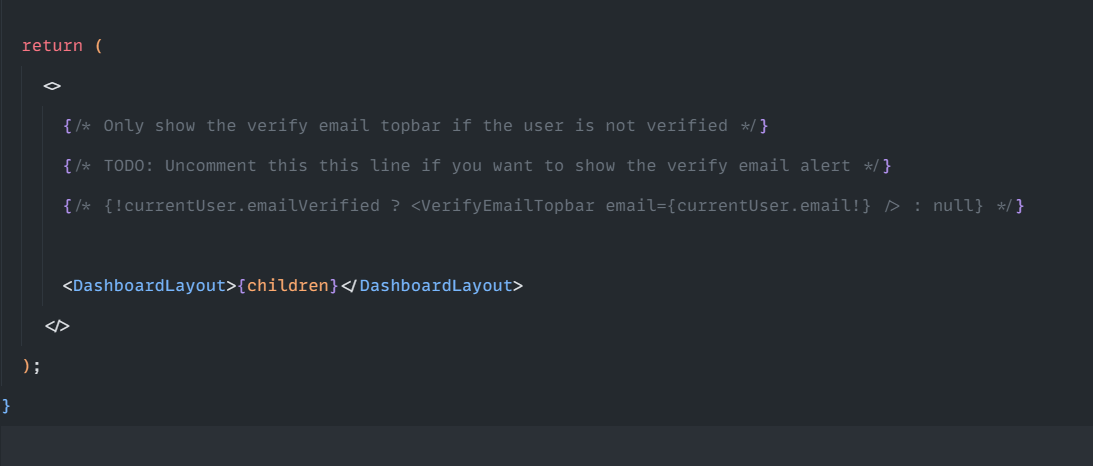
Email Verification
- NextSaasPilot comes with built-in user email verification functionality.
- To enable this feature, simply uncomment the relevant code in the
/src/app/dashboard/layout.tsxfile.